
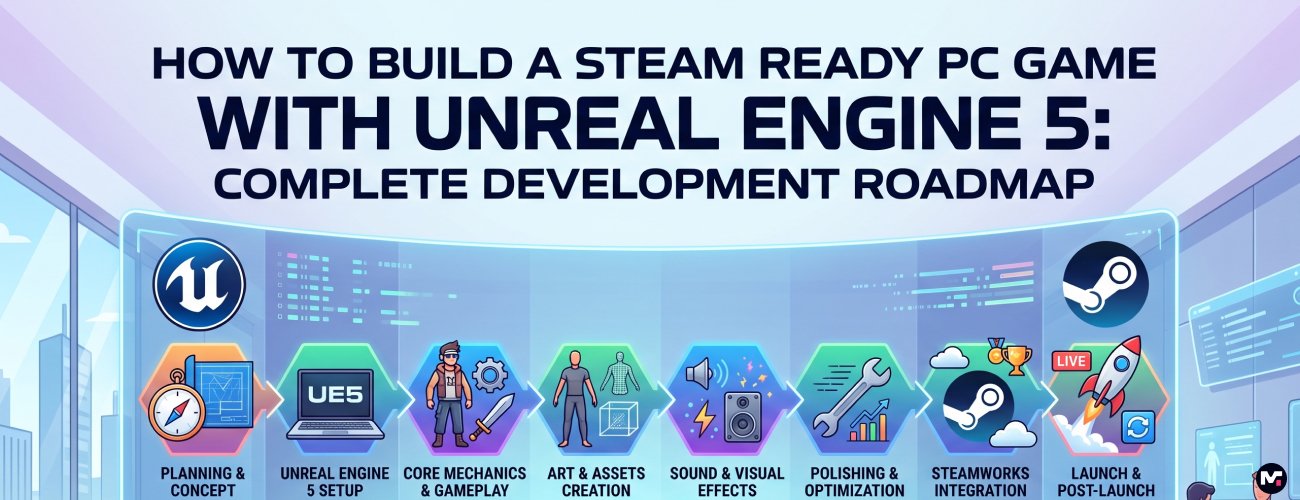
Building a PC game is very different from simply building a playable game.
A prototype can be created in a few weeks. A game that players can download from Steam, play smoothly on different computers, understand easily, and enjoy for hours requires much more planning, development, testing, optimization, and attention to detail.
Unreal Engine 5 has changed what is possible for independent studios, startups, and game developers. With powerful tools for environments, lighting, animation, physics, artificial intelligence, multiplayer development, and visual quality; developers can now create experiences that were once possible only for much larger teams.
But having access to powerful technology does not automatically make a game successful. The real challenge is knowing what to build, how to build it, when to optimize it, how to test it, and how to prepare the final product for Steam.
At MunchTechnoZ, you can hire a dedicted game development team to work on your game development projects where the journey often starts with nothing more than an idea, a concept document, or an early prototype. Over time, that idea has to become a properly structured game that can be tested, optimized, and eventually released to players.
In this guide, we will explain the complete journey of building a Steam ready PC game with Unreal Engine 5.
What Does Steam Ready Actually Mean?
A game being playable on a developer’s computer does not mean it is ready for Steam.
A Steam ready game should provide a reliable experience for real players using different hardware configurations. Depending on the type of game, this can include:
- Stable gameplay
- Proper input and controller support
- Save and load functionality
- Graphics settings
- Resolution support
- Audio settings
- Performance optimization
- Loading optimization
- Error handling
- Multiplayer functionality where required
- Achievements
- Steam integration
- Cloud saves where required
- Proper installation and update behavior
- Compatibility testing
- Quality assurance testing
- Crash handling
- Appropriate system requirements
There is also the commercial side of the launch.
Your Steam store page, screenshots, trailer, game description, capsule artwork, pricing, wishlists, community building, and launch strategy all have an important role to play.
This is why we recommend thinking about Steam from the early stages of development instead of treating it as something that happens after development is finished.
Step 1: Start With the Game Idea and Game Design Document
Every successful game development project needs a clear direction. The first stage is not opening Unreal Engine and immediately starting development.
It is understanding the game. Get your answers ready for the following questions.
- What type of game are you building?
- Who is the target audience?
- What is the core gameplay loop?
- What makes the game interesting?
- How many levels or environments will it have?
- Will it be single player or multiplayer?
- What platforms will it support?
- What is the expected development budget?
- What is the planned release model?
These questions are important to address because they influence almost every technical decision that follows.
A Game Design Document, commonly called a GDD, helps bring these decisions together. The document does not need to be hundreds of pages. What matters is that the development team understands the vision and priorities.
A good GDD can include gameplay mechanics, characters, environments, progression, combat systems, user interface, monetization, multiplayer requirements, audio direction, art style, technical requirements, and the overall player experience.
At MunchTechnoZ, we prefer to clarify these fundamentals before significant development begins because changing the core direction after months of development can become expensive.
Step 2: Plan the Unreal Engine 5 Architecture
Once the game direction is clear, the technical architecture needs to be planned.
Unreal Engine 5 provides several powerful systems that can be used depending on the requirements of the game.
Blueprints can be extremely useful for gameplay logic and rapid iteration.
C++ can be used where deeper control, performance, reusable systems, or more complex architecture is required.
The right approach is usually not about choosing one and ignoring the other.
Many production games use both.
The architecture also needs to consider systems such as:
- Player controllers
- Character systems
- Inventory
- Weapons
- Combat
- Artificial intelligence
- Quest systems
- Dialogue
- Save systems
- User interface
- Audio
- Multiplayer
- Backend communication
- Analytics
- Player progression
- Performance monitoring
Planning these systems early makes development considerably easier later.
Step 3: Build a Playable Prototype
One of the biggest mistakes we see in game development is trying to build the complete game immediately.
A better approach is to build a prototype first. The prototype should answer one simple question:
Is the game actually fun to play?
For example, if you are creating an action RPG, the prototype might contain one character, one environment, a small number of enemies, basic combat, movement, health, and a simple progression system.
The graphics do not need to be final.
The environment does not need to be beautiful.
The purpose is to validate gameplay.
This stage can save significant development time because problems are much cheaper to solve before the full production begins.
Once the core gameplay feels right, the project can move toward production.
Step 4: Develop the Core Gameplay Systems
This is where the game starts becoming a real product.
The development team begins building the systems that define the player’s experience.
Depending on the game, this could include:
- Character movement
- Combat
- Weapons
- Skills
- Inventory
- Crafting
- Quests
- Dialogue
- Enemy behavior
- Boss mechanics
- Character progression
- Rewards
- Game economy
- Missions
- Level progression
- Checkpoints
- Save systems
The important thing is to develop these systems in a structured way.
A game can have beautiful graphics and still feel unfinished if its core gameplay systems are inconsistent.
Players notice movement, controls, responsiveness, combat feedback, camera behavior, animation transitions, loading times, and many other details almost immediately.
Good game development is often about getting hundreds of small things right.
Step 5: Build Characters, Environments and Game Assets
Unreal Engine 5 makes it possible to create highly detailed environments and visually impressive worlds.
Technologies such as Nanite can help developers work with highly detailed geometry, while Lumen provides advanced lighting capabilities. However, using these technologies does not mean optimization can be ignored.
Every asset still needs to be considered carefully.
Characters require models, materials, skeletons, animations, facial elements, effects, and sometimes multiple levels of detail.
Environments require architecture, terrain, props, vegetation, lighting, materials, effects, and gameplay elements. For a large game, asset production can become one of the biggest parts of the development schedule.
This is why a strong asset pipeline is important.
At MunchTechnoZ, we can work with existing client assets, create new game assets, or integrate assets from suitable sources depending on the project’s requirements and budget.
Step 6: Add Artificial Intelligence and NPC Systems
Artificial intelligence plays an important role in many modern PC games.
Enemy AI may need to patrol an environment, detect the player, attack, retreat, search for the player, communicate with other enemies, and react to the environment.
NPCs may require completely different behavior. They may have schedules, conversations, quests, relationships, shops, or other interactions.
Unreal Engine provides powerful tools for building these behaviors. But good AI is not simply about making an enemy difficult. It should make the game feel believable and enjoyable.
A strong AI system should support the intended gameplay experience rather than simply increase difficulty.
Step 7: Multiplayer and Backend Development
If your game includes multiplayer, this decision should be made very early.
Multiplayer architecture affects the entire development process.
The team needs to think about:
- Server architecture
- Player authentication
- Matchmaking
- Player synchronization
- Network performance
- Dedicated servers
- Game state
- Player progression
- Inventory synchronization
- Anti cheat considerations
- Leaderboards
- Backend services
- Cloud data
- Monitoring
Trying to add multiplayer after completing a single player game can require major architectural changes.
For multiplayer projects, we recommend planning the network architecture during the initial technical design stage.
Depending on the project, different technologies and services can be integrated with Unreal Engine to handle multiplayer and backend requirements.
Step 8: Optimize the Game for PC
This is one of the most important stages of PC game development.
A game may run perfectly on the developer’s machine and perform poorly on a player’s computer.
PC players have a huge range of hardware configurations.
Some players may have a high end gaming PC with a powerful graphics card. Others may use an older system.
Optimization therefore needs to be approached throughout development.
Important areas include:
- Frame rate
- Memory usage
- CPU performance
- GPU performance
- Loading times
- Texture memory
- Draw calls
- Lighting
- Effects
- Animation
- AI processing
- Level streaming
- Asset loading
- Shader compilation
Unreal Engine provides profiling tools that help developers identify performance problems.
Optimization should not be postponed until the final week before launch. The earlier performance issues are identified, the easier they are to solve.
Step 9: Build the User Interface and Player Experience
A professional PC game needs more than gameplay.
Players interact with menus, settings, inventory screens, maps, loading screens, pause menus, character screens, notifications, tutorials, and many other interface elements.
The interface needs to be clear and responsive.
For PC games, keyboard and mouse controls need to be considered carefully. If controller support is planned, that needs to be tested separately as well.
Accessibility can also be considered during this stage.
Options such as subtitles, text size, graphics settings, control customization, audio settings, and other accessibility features can significantly improve the player experience.
Step 10: Testing and Quality Assurance
Testing is where many hidden problems finally become visible.
The development team should test the game continuously instead of waiting until the final build.
Testing should include:
- Functional testing
- Gameplay testing
- Performance testing
- Multiplayer testing
- Controller testing
- Keyboard and mouse testing
- Graphics testing
- Save and load testing
- Installation testing
- Different resolution testing
- Different hardware testing
- Crash testing
- Regression testing
One of the most valuable forms of testing is real player testing. Developers already know how the game works.
A new player does not.
Watching someone play the game for the first time can reveal confusing instructions, difficult controls, unclear objectives, poor UI decisions, and gameplay problems that the development team may have stopped noticing.
Step 11: Integrate Steam Features
Once the game is approaching production readiness, Steam integration becomes an important part of the project.
Depending on the game, this may include:
- Steam achievements
- Cloud saves
- Player statistics
- Leaderboards
- Friends functionality
- Controller support
- Steam overlay
- Networking features
- Build management
The exact requirements depend on the game.
It is also important to create a proper build pipeline so that new builds can be packaged, tested, and distributed efficiently.
Step 12: Prepare the Steam Store Page
Your game can be technically excellent and still struggle to attract players if the Steam store page is weak.
The store page is often the first place a potential player experiences your game.
Important elements include:
- Game title
- Short description
- Full description
- Screenshots
- Trailer
- Capsule artwork
- System requirements
- Supported languages
- Features
- Pricing
- Release information
The screenshots should communicate gameplay rather than simply showing attractive scenery.
The trailer should quickly explain what makes the game interesting.
The store description should tell players why they should care about the game.
This is also where wishlists become important.
Building the audience before launch can significantly improve the chances of getting attention when the game finally releases.
Step 13: Beta Testing and Early Access
Before releasing the final version, consider getting the game into the hands of real players.
A controlled beta can provide valuable feedback.
Early Access can also be considered depending on the type of game.
However, Early Access should not be treated as an excuse to release an unfinished product.
Players should understand what they are purchasing and what the development roadmap looks like.
The feedback collected during this stage can help improve gameplay, balance, performance, and overall player experience.
Step 14: Launch and Post Launch Support
The launch is not necessarily the end of development.
For many PC games, it is the beginning of the next phase.
After launch, developers need to monitor:
- Crash reports
- Player feedback
- Reviews
- Performance issues
- Gameplay problems
- Server issues
- Bugs
- Player retention
- Community feedback
Updates and patches can improve the game after launch.
Depending on the project, post launch development may also include new levels, characters, weapons, quests, features, seasonal content, or other updates.
A good post launch plan should be considered before launch rather than after problems appear.
How Much Does It Cost to Build a Steam Game With Unreal Engine 5?
There is no single price for Unreal Engine 5 game development.
The cost depends heavily on the scope of the game.
A small indie game with limited environments and simple mechanics can require a relatively small team.
A large RPG with multiple environments, complex AI, hundreds of assets, cinematic sequences, multiplayer, and extensive progression systems can require a much larger team and development timeline.
Some of the biggest cost factors include:
- Game complexity
- Number of levels
- Number of characters
- Environment size
- Art quality
- Animation requirements
- AI complexity
- Multiplayer requirements
- Backend requirements
- Number of platforms
- Testing requirements
- Steam integration
- Post launch support
Before development begins, it is useful to divide the project into milestones and estimate each phase separately.
This gives the studio or game owner much better visibility into the overall investment.
How Long Does It Take to Build a Steam Game?
Development time varies just as much as development cost.
A small game may be completed within several months.
A larger game can take one or several years depending on scope and team size.
The best approach is to avoid estimating the entire project only by saying, “It will take one year.”
Instead, divide development into milestones.
For example:
Pre Production
Game design, technical planning and prototype
Production
Gameplay, environments, characters, AI, UI and systems
Polishing
Animation, effects, balancing and user experience improvements
Optimization
Performance profiling and hardware testing
QA
Bug fixing and compatibility testing
Steam Preparation
Store page, builds, achievements and launch preparation
Launch
Release management and monitoring
This provides a much clearer picture of progress.
Should You Hire an Unreal Engine Game Development Company?
Building a game internally can make sense for studios that already have an experienced Unreal Engine team.
For founders, startups, publishers, and companies without an established game development team, working with an experienced development partner can reduce the time required to build the initial team and technical infrastructure.
The right development partner should understand more than Unreal Engine. They should understand game development as a complete process.
That includes gameplay, art integration, performance, multiplayer, QA, deployment, and the realities of launching a commercial game.
Communication is equally important.
A development team should be able to explain technical decisions clearly, provide regular progress updates, identify risks early, and work with the client’s product vision.
How MunchTechnoZ Can Help Build Your Unreal Engine PC Game
At MunchTechnoZ, we approach Unreal Engine game development as a product development process rather than simply writing game code.
We can work with you from the early concept stage or join an existing project that already has a prototype or partially developed game.
Our Unreal Engine development capabilities can support PC game development from initial prototyping through optimization and Steam launch.
- Game prototyping
- Unreal Engine 5 development
- Gameplay programming
- Blueprint development
- C++ development
- Character systems
- AI and NPC development
- Environment integration
- UI and UX
- Multiplayer development
- Backend integration
- Performance optimization
- PC game development
- QA and testing
- Steam preparation
We can also work with different engagement models depending on your project.
If you have a complete game specification, we can discuss project based development.
If you already have a team and need additional Unreal Engine expertise, dedicated developers or staff augmentation can be a better option.
If you are still validating the idea, we can begin with a prototype and then plan the production phase based on the results.
Your Game Idea Can Start Small
One of the most important lessons we have learned from game development is that a great game does not need to start as a huge game.
Start with the core idea.
Build the smallest version that can demonstrate the gameplay.
Test it.
Learn from players.
Improve it.
Then scale the project.
Unreal Engine 5 gives developers an impressive set of tools to create modern PC games, but the technology is only one part of the equation.
The right planning, development process, team structure, testing strategy, optimization, and launch preparation are what turn an idea into a product that players can actually enjoy.
If you have a PC game idea and want to explore what it would take to turn that idea into a Steam ready game, MunchTechnoZ can help you plan the development journey, from prototype to production and launch.
Have a PC game idea? abuild it together.
Contact MunchTechnoZ to discuss your game concept, development requirements, team structure, and the best approach for taking your game toward Steam.